LearnDash Review (2026): My 30-Day Experience Using It for Course Creation
March 13, 2026


When I decided to test LearnDash for 30 days, I wanted to understand one thing clearly: Can it truly power a serious online course business?
As part of the Khajabi team, I regularly evaluate platforms that creators use to build, sell, and scale their digital education products. This LearnDash review is not based on assumptions or surface-level research. It comes from actually using the platform on a pre-built website, setting up courses, configuring lessons, exploring add-ons, and experiencing the workflow from both admin and learner perspectives.
In this detailed LearnDash review, I’ll walk you through:
If you’re considering LearnDash, this review will help you make an informed decision.
LearnDash is a WordPress-based Learning Management System (LMS) plugin designed to help creators build structured online courses.

Unlike hosted platforms (where everything is built-in), LearnDash works inside WordPress. That means:
It gives you complete control but also requires more setup.
From my experience, LearnDash feels less like a plug-and-play tool and more like a professional-grade LMS engine.
It’s widely used by:
Since I used it on a pre-built website, the initial setup was smoother than starting from scratch. However, I immediately noticed something:
LearnDash is powerful, but not beginner-simple.
The dashboard is feature-rich. You get options for:
At first glance, it felt structured and serious. Not flashy. Not overly modern. But functional.
Within the first few days, I realized LearnDash focuses heavily on structured education rather than marketing aesthetics.
This is where LearnDash truly shines.
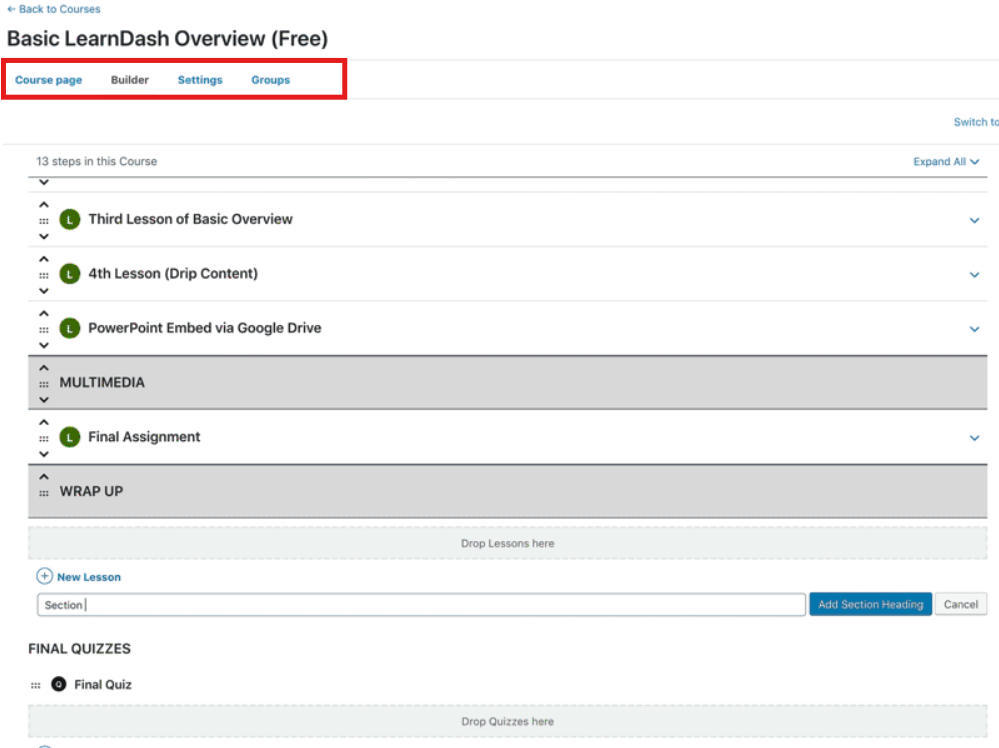
LearnDash uses this structure for creating, i.e.,
Course → Lessons → Topics → Quizzes
This felt extremely organized.
For example:
This structure is excellent for academic-style programs or certification courses. It allows you to design logical learning paths without confusion.
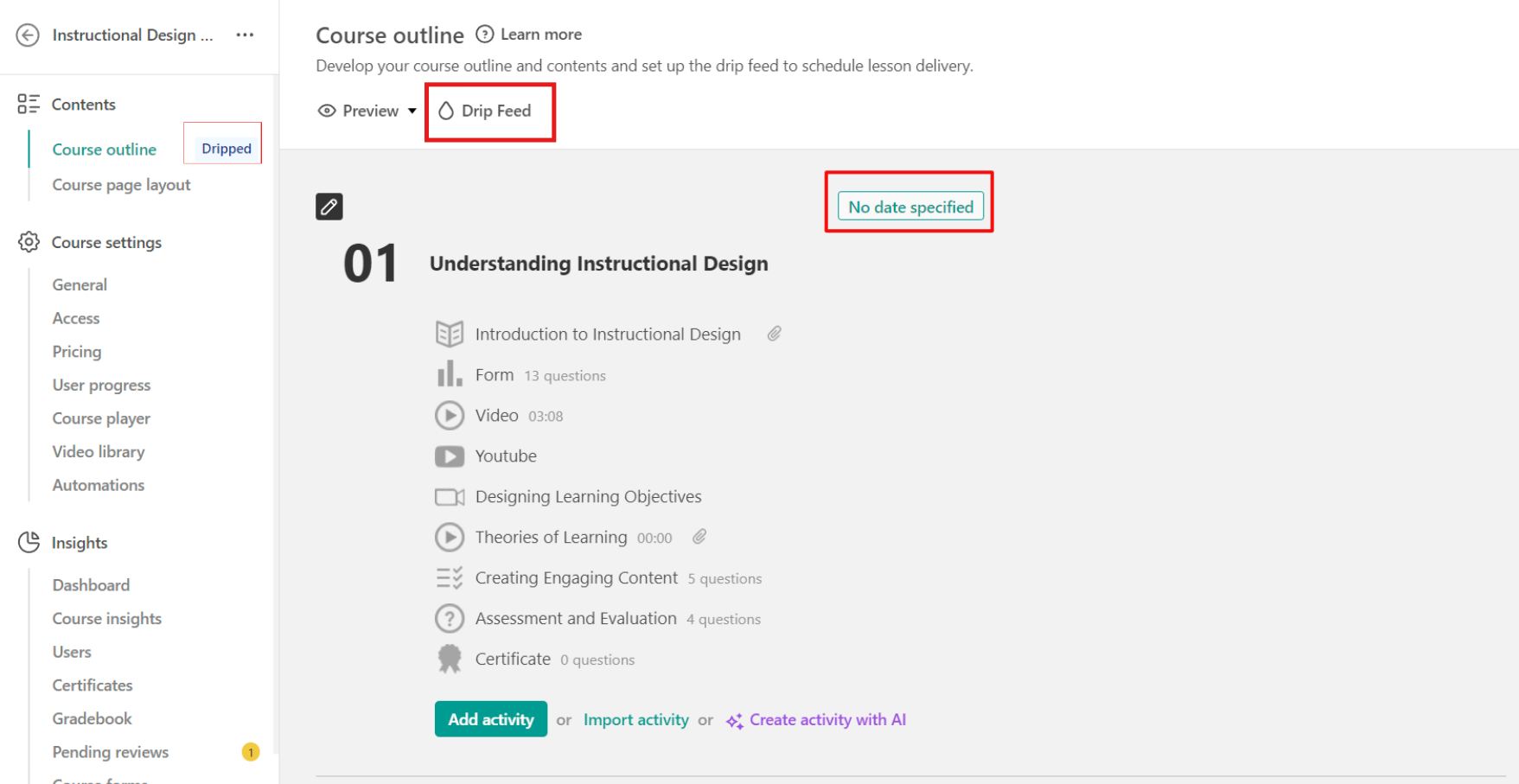
One feature I liked during this LearnDash review testing period was drip content, as it kept students engaged and learning step-by-step.
You can:
This makes it ideal for:
It felt reliable and precise, working smoothly without glitches and releasing lessons exactly as scheduled.
The quiz builder is detailed and robust, offering multiple question types, timers, and customization options for effective assessments.
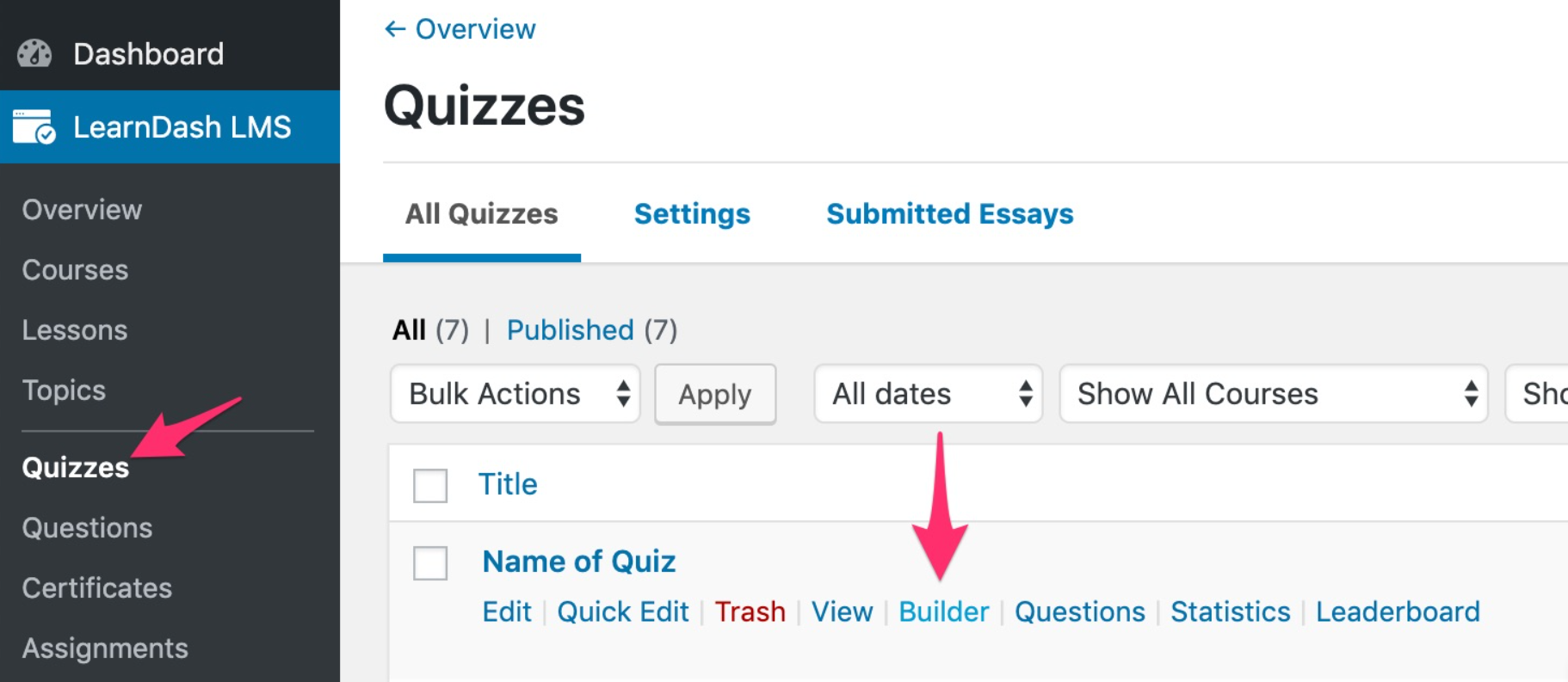
You can create:
What stood out during this LearnDash review process was how configurable quizzes are.
You can:
It feels like a serious academic tool. If you’re building compliance training or certification programs, this is powerful.
LearnDash allows certificate generation when students:
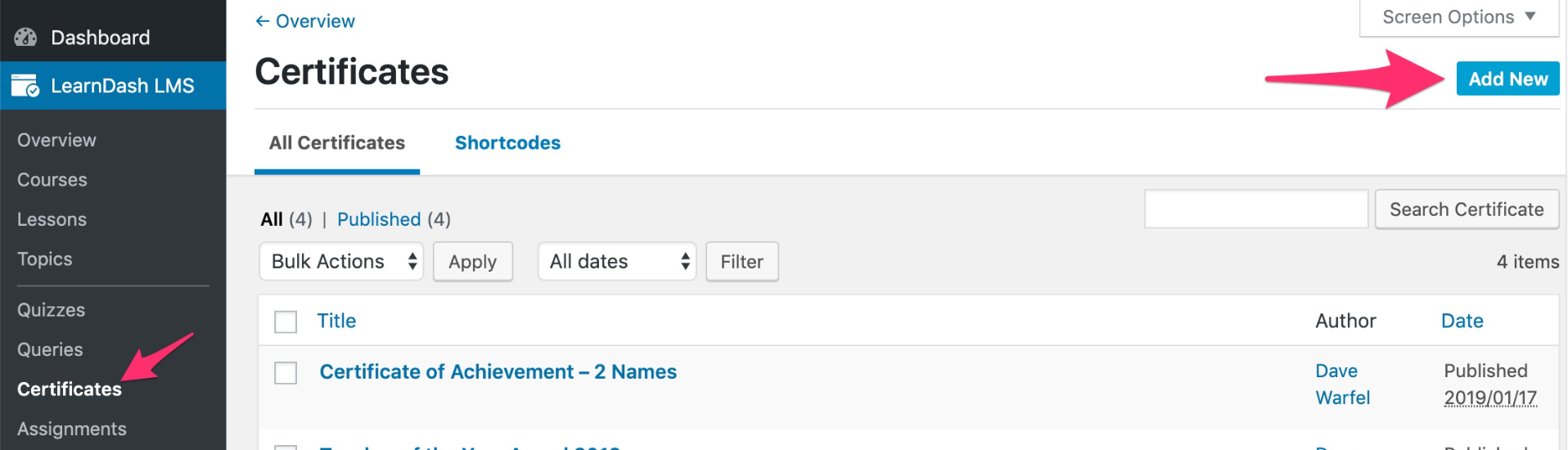
You can customize certificate design using templates.
During my 30 days of testing, this feature worked smoothly and added a professional touch.
However, customization requires some knowledge of styling if you want advanced design control.
The interface felt clean and intuitive, progress tracking was clear, and navigation between lessons was smooth and distraction-free.
The course layout is well-structured, but its appearance largely depends on your WordPress theme. LearnDash doesn’t add heavy styling on its own; it adapts to whatever theme you’re using.
So, if your theme looks modern, your course will look modern. If your theme is simple or outdated, your course design will reflect that.
The LMS engine is solid, but the design depends on you.
Students can see their progress through clear progress bars, track completed lessons easily, and resume exactly where they left off. During my testing, all of this worked smoothly and felt reliable and professional within the overall learning experience.
Lesson navigation is simple and easy to follow, with clear previous and next lesson buttons and a well-organized topic structure. However, compared to some all-in-one hosted platforms, it doesn’t feel highly interactive or visually dynamic. It works efficiently, but it’s more practical than immersive.
Because LearnDash is WordPress-based, this part is extremely important. Your overall experience doesn’t depend only on LearnDash; it also depends on how well your WordPress setup is managed.
This level of control is unmatched by hosted platforms. But,
One feature that adds a lot of value in LearnDash is the Groups functionality. It is designed to help manage multiple learners in an organized way, especially when courses are being delivered to teams, classrooms, or organizations. Instead of handling every student individually, Groups allow you to structure learners under leaders or departments, making management much easier.
From a business perspective, this makes LearnDash highly scalable for managing large learning communities.
LearnDash offers both free add-ons and premium add-ons, which help extend the platform beyond its core LMS features. These add-ons allow creators to customize their learning environment and add more advanced functionality based on their needs. Some notable ones include:
The ecosystem around LearnDash is quite strong and continues to grow. However, one thing I noticed is that while the core LMS features are solid, many advanced marketing or business features rely on third-party plugins and integrations.
This is where LearnDash clearly differs from most all-in-one course platforms. Instead of bundling every business tool inside the platform, LearnDash focuses mainly on delivering a strong learning management system. LearnDash does not include built-in tools for:
Because of this, you typically integrate tools such as:
This approach gives you a lot more flexibility in building your course business exactly the way you want. However, it also means there are a few additional setup steps compared to all-in-one platforms.
Since LearnDash runs on WordPress, overall performance depends on several factors within your website setup.
On a well-optimized website, LearnDash runs smoothly and delivers a reliable learning experience. However, if the hosting environment is weak or poorly configured, the overall experience can suffer.
Because of this, choosing a good hosting provider becomes extremely important when running a LearnDash-based course platform.
LearnDash offers two ways to use the platform. You can either install the WordPress plugin on your own website or choose the LearnDash Cloud version, which comes with hosting and a pre-built setup. Below is a clear breakdown of both options. Now, let’s talk about pricing in this LearnDash review.
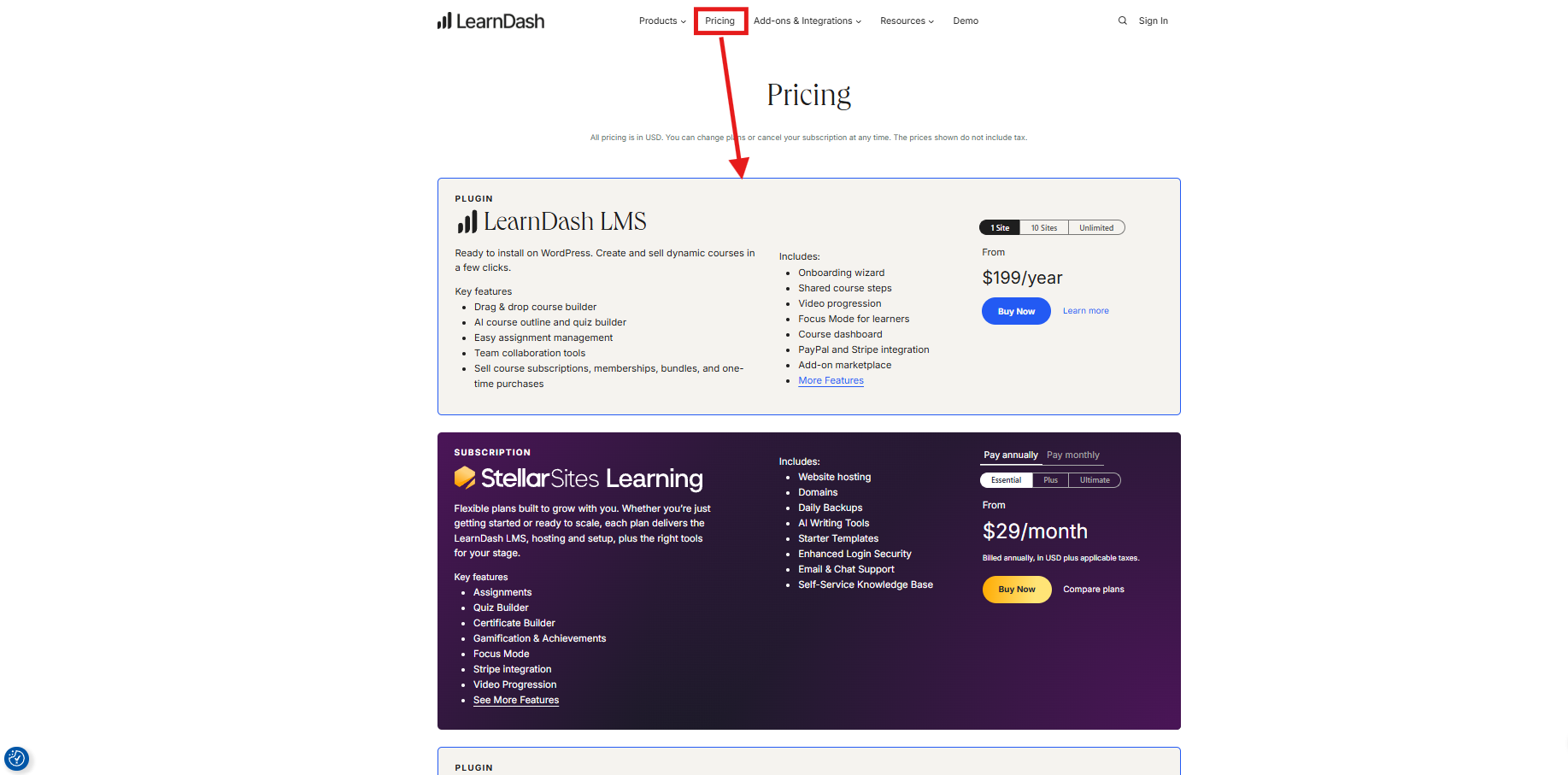
This is the most popular option and is designed for users with a WordPress website. You install the plugin and turn your site into a full LMS platform.
Best for individual course creators, bloggers, and small educators
Ideal for agencies, trainers, or businesses running multiple learning platforms
Best for developers, large organizations, or LMS service providers.
If you don’t want to manage hosting, WordPress setup, or technical maintenance, LearnDash Cloud provides a ready-to-use solution.
Good for beginners launching their first course site
Ideal for growing course businesses
Best for training academies or large online schools
Even though LearnDash itself is affordable, you may still need a few extra tools depending on your setup.
Before choosing any LMS platform, it’s important to understand both its strengths and limitations. Here’s a quick overview of the main LearnDash pros and cons.
LearnDash is best suited for users who want flexibility, control, and a scalable learning platform.
LearnDash is a WordPress LMS plugin. You install it on an existing WordPress website to create and manage courses. If you prefer a ready-to-use setup, LearnDash Cloud provides hosting and WordPress already configured
Yes. LearnDash supports one-time payments, subscriptions, and memberships. You can also offer free lessons or sample courses to attract potential students.
Not necessarily, but there is a small learning curve. The drag-and-drop builder is simple, but setting up payments, themes, and integrations may take some time.
Yes. LearnDash works with most WordPress themes, but modern themes like Astra, Kadence, or BuddyBoss usually provide better course design.
Yes. LearnDash includes drip content functionality, allowing lessons to unlock on specific dates or after a certain number of days.
Yes. LearnDash includes a built-in certificate system that can automatically generate certificates when students complete courses or pass quizzes.
Yes. LearnDash courses work well on mobile browsers, allowing students to learn from phones or tablets without issues.
Yes. LearnDash offers a powerful quiz builder with multiple question types, including multiple choice, essays, and file upload assignments.
Your courses and website will continue to work, but you will stop receiving updates, new features, and technical support.
The core plugin starts at $199 per year for one website. You may also need hosting, a domain name, and video hosting for course content.
After testing LearnDash thoroughly for 30 days on a pre-built website, this review is based on real hands-on experience. As part of the Khajabi team, we evaluated the platform not only from a user’s perspective but also from a creator’s business standpoint. LearnDash offers serious LMS capabilities, with a structured course hierarchy, a powerful quiz system, and the flexibility of WordPress, making it a strong option for creators who want full control over their learning platforms.
That said, LearnDash does require technical confidence and careful setup to use effectively. It is best suited for those building structured, long-term education platforms who value ownership and customization. If simplicity and built-in marketing tools are your top priorities, a more streamlined LMS might be a better fit. Ultimately, LearnDash may not be the easiest platform to use, but it stands out as one of the most powerful.


August 3, 2026

July 31, 2026

July 30, 2026

July 24, 2026
